Web Class Helper:实用网课小助手
昒昕
·
·
科技·工程
Web Class Helper:从安装到爱上
献给 \texttt{Web Class Helper V2.0.0}。
一、介绍篇
-
你是否在为了上网课不能专注,总是控制不住自己 小窗水文章/水无声视频/聊天 分心而苦恼?
-
你是否在阴语课出现看不懂的单词或句子时,打开某翻译,却发现非常耗时不方便而苦恼?
-
当你手机没收或没电时,你是否在上网课迟到时苦恼于不能方便地在电脑上设置闹钟?
-
当你网十分卡顿想要测速时,打开某危险卫士太麻烦还让电脑更卡,你是否想要快速便捷不占内存的测网速方式?
-
还有更多实用功能,等你发现……
\color{blue}\texttt{Web Class Helper V2.0.0} \; \text{就可以解决以上烦恼。}
今天我将为大家介绍一款好用的开源命令行软件:\color{black}{\texttt{Web Class Helper V2.0.0}},支持 32 位和 64 位操作系统,后文的 \texttt{WCH} 是这款软件的简写。
Github 最新版本下载地址 | 蓝奏云下载地址 | 源码仓库地址 | 官方 Wiki 帮助文档。
负责 \color{black}{\texttt{Web Class Helper V2.0.0}} 开发的是 \color{black}{\texttt{Class Tools Develop Team}},初衷是「提高课堂趣味性」。
目前团队里有数十位经验丰富的开发人员,已开发数十款软件,\texttt{Web Class Helper} 是团队的代表作。
团队 Github 介绍页面 | 团队官网 | yuchen 的 团队介绍 blog。
(yuchen 的 blog 可能有随机 BGM,虽然概率极小,但请务必静音浏览)
+ 防摸鱼模式,并支持杀指定进程、中英翻译、待做列表、定时闹钟、一键截图、获取系统时间、获取随机句,等等功能……
---
### 二、帮助篇
#### 1. 安装方法
在 [下载地址](https://github.com/class-tools/Web-Class-Helper/releases/latest/) 上,选择 `WCH_v2.0.0_x64/x86.msi`,下载。
如果 Github 的下载很慢,可以使用蓝奏云的 [下载链接](https://wwn.lanzouj.com/iNQym0527y0j)。
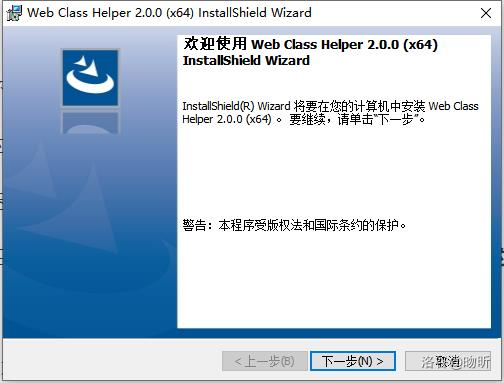
下载安装包后,设置安装路径,一路 $\textrm{Next}$ 即可,心情好可以看看营业执照(?)。
下载完后,打开桌面的快捷方式, ,就可以使用啦。
可能概率极小地出现软件权限不够访问安装目录文件夹,如果出现软件权限问题,可以把下载压缩包里的 `WCH.vbs` 放在安装目录下
`C:\Program Files\Class Tools Develop Team\Web Class Helper`,然后双击运行即可。
**建议在安装时退出杀毒软件,并忽略一切误报。**
#### 2. 食用方法
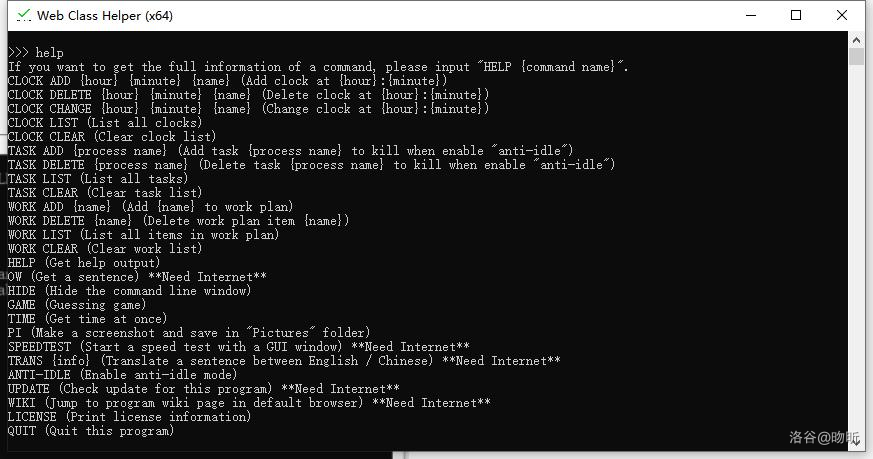
| 命令 | 命令作用|参数| 备注 |
| :--: | :--: | :--: | :--: |
|$\tt{anti-idle}$ | 开启“专注模式” | 无 | 隐藏任务栏,杀指定进程,$100\%$ 专注听课,配合 $\tt{task}$ 命令食用更佳。
| $\tt{clock}$ | 设置闹钟 |$\tt{add/delete/change/list \{hour\} \{minute\}\{name\}}$|支持增加、删除、替换闹钟,需要在运行状态下才能提醒,支持周期闹钟(如每周一 $\textrm{13:30}$)|
|$\tt{task}$ | 设置“专注模式”时要杀的进程 |$\tt{add/delete/list \{process name\}}$|可以在“专注模式”下取消指定的进程,比如在网课时禁止自己打开 $\tt{chrome.exe}$ 等|
|$\tt{work}$ | 设置待做列表 | $\tt{add/done/list\{name\}}$ | 配合闹钟食用效果更佳|
|$\tt{trans}$ | 中英翻译 | 英文或中文句子 | 可含空格 |
|$\tt{pi}$ | 快速截图 | 无 | $\tt{WCH}$ 将隐藏自己,然后再截图,图片将保存在 $\tt{Picture}$ 文件夹和剪贴板|
|$\tt{speedtest}$ | 获取当前网速 | 无 | 将打开由 $\tt{python}$ 编写的图形化测速小公举 |
|$\tt{ow}$ | 获取随机句 | 无 | 纯粹为了练爬虫,作用不明(?)|
|$\tt{help}$ | 帮助 | 无/所有命令 | 当没有参数时,输出列表;否则输出该参数命令的具体帮助|
|$\tt{hide}$ | 隐藏程序 | 无 | 觉得 $\tt{WCH}$ 占任务栏,可以直接隐藏,闹钟照样提醒,按 $\tt{Ctrl + Down}$ 恢复
| 其他十几种 | 详见 $\tt{help}$ | 无 | $\tt{quit}$ 为退出程序并保存相关数据,$\tt{update}$ 有炫酷红绿进度条(?|
---
### 三、程序相关篇
本篇将从一位开发者的角度,带你浅谈 $\texttt{WCH}$。
介绍代码版本为 $\texttt{Web Class Helper V2.0.0}$ 正式版。
本项目由 $\texttt{C++}$ 和 $\texttt{Python}$ 语言编写,其中,`speedtest,trans` 命令通过 $\tt{Python}$ 语言实现。
主要分为:
+ 主程序 `WCH.cpp` (调用其他函数)
+ `commands.h` (所有的命令函数,如 `anti-idle,trans` 等)
+ `fuctions.h` (所有的小函数、如转小写函数 `WCH_TransStrChar`)
+ `apis.h` (执行有关系统 API 命令)
#### 1. ```WCH.cpp``` 浅谈([文件地址](https://github.com/class-tools/Web-Class-Helper/blob/master/WCH.cpp))
```cpp
#define WCH_VER "2.0.0"
#include "modules/file-process.h"
#include "modules/init.h"
#include "modules/commands.h"
#include "modules/functions.h"
#include "modules/apis.h"
#include "modules/variables.h" // 要按照顺序include,否则会出现未定义函数的错误
// 省略一堆内容
int main() {
WCH_Init(); // 初始化
while (true) { // 主循环
if (WCH_cmd_line) { // 检测是否在隐藏窗口模式
WCH_CL_Init(); // 初始化提示符">>>",并读入命令
if (WCH_command_support.find(WCH_command_list[0]) != WCH_command_support.end()) { // 查找命令是不是 map 中的键值
WCH_printlog(WCH_LOG_STATUS_INFO, "Using command \"" + WCH_command + "\""); // 写进日志
WCH_command_support.find(WCH_command_list[0]) -> second(); // 使用 map 查找键值
} else {
WCH_printlog(WCH_LOG_STATUS_INFO, "Using unknown command \"" + WCH_command + "\""); // 写进日志
WCH_Error(WCH_ERRNO_UNCORRECT); // 错误处理
}
cout << endl;
}
}
}
```
上述为输入命令,使用 `map` 调用对应命令的函数,实现了函数化和模块化。
#### 2. ```commands.h``` 浅谈 [文件地址](https://github.com/class-tools/Web-Class-Helper/blob/master/modules/commands.h)
将选取 `update,pi,anti-idle` 命令进行讲解。
```cpp
void WCH_update() {
// Visit the website to update the program.
if ((int)WCH_command_list.size() != 1) { // 判断命令是否合法
WCH_Error(WCH_ERRNO_UNCORRECT);
return;
}
try {
cout << "Checking update..." << endl;
WCH_ProgressBarTot = 5;
thread T(WCH_ProgressBar); // 线程
T.detach(); // 多线程,不堵塞当前线程
string url = "https://class-tools.gq/update/WCH?"; // 为防止缓存造成未联网仍可获取版本
srand((unsigned)time(NULL));
url += to_string(rand());
URLDownloadToFile(0, url.c_str(), "WCH_UPD.tmp", 0, 0); // 下载到本地临时文件
string res;
fin.open("WCH_UPD.tmp");
getline(fin, res);
fin.close();
WCH_Sleep(5000);
if (res == "") { // 如果获取最新版本失败
throw runtime_error("WCH_ERRNO_NETWORK_FAILURE: \"Check Update\""); // 抛出 RE
}
if (WCH_CheckVersion(WCH_GetVersion(WCH_VER), WCH_GetVersion(res))) { // 使用比较函数
cout << "Program version is less than latest released version, jumping to releases page..." << endl;
system("start resources/website/releases.url"); // 打开 GitHub 上下载地址的快捷方式
WCH_printlog(WCH_LOG_STATUS_INFO, "Updating to version \"" + res + "\""); // 日志
} else { // 当前版本大于或等于最新版本
cout << "Program version equals or is greater than latest released version." << endl;
WCH_printlog(WCH_LOG_STATUS_INFO, "Program version equals or is greater than \"" + res + "\"");
}
DeleteFile(L"WCH_UPD.tmp"); // 删除临时文件
} catch (...) { // 理论上是不会 RE 的,try 中有 throw
WCH_Error(WCH_ERRNO_NETWORK_FAILURE);
return;
}
}
void WCH_pi() {
// A sequence of function to make a screenshot.
if ((int)WCH_command_list.size() != 1) { // 判断命令是否合法
WCH_Error(WCH_ERRNO_UNCORRECT); // 错误
return;
}
WCH_SetWindowStatus(false); // 隐藏自己窗口
WCH_PutPicture(); //截图
WCH_SetWindowStatus(true); // 显示自己
WCH_SaveImg(); // 存入 Pictures 文件夹,并复制到剪贴板
cout << "The picture is in the clipboard and be saved in your Pictures folder." << endl;
}
void WCH_anti_idle_func() {
// Enable anti-idle function.
if ((int)WCH_command_list.size() != 1) { // 判断是否多输入了
WCH_Error(WCH_ERRNO_UNCORRECT); // 错误
return;
}
string ch;
cout << "Are you sure to enable anti-idle function? If you want to disable it, press Ctrl + Down. (Y/N): ";
getline(cin, ch); // 一切皆可 getline
if (ch == "Y" || ch == "y") { // 检测输入
WCH_SetWindowStatus(false); // 隐藏自己
WCH_anti_idle = true; // 启用“专注模式”
WCH_Sleep(500);
WCH_SetWindowSize(SW_MAXIMIZE, GetActiveWindow()); // 设置窗口大小
WCH_Sleep(500);
WCH_SetTrayStatus(false); // 隐藏系统任务栏
WCH_Sleep(500);
thread T(WCH_check_task_loop); // 线程
T.detach(); // 开另一线程,不堵塞当前进程
}
}
```
---
#### 番外篇 - 彩蛋:如何卡出 WCH 的 Feature
在一打开 WCH 时的炫酷进度条时,你是否觉得炫酷进度条的时间太短,不够你欣赏?

在进度条显示时,只要按下 $\textrm{Ctrl+A}$ 全选,过一段时间,再按方向键取消选择,你就会发现……
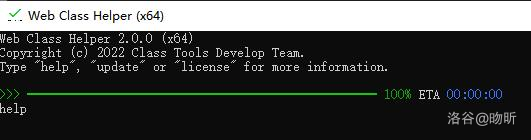
怎么样?是不是很神奇呢?
(修不了就当成彩蛋处理了)
---
### 四、后记
如果有反馈或建议可以在 [Github Issue 页面](https://github.com/class-tools/Web-Class-Helper/issues) 、发送邮箱到 [[email protected]](mailto:[email protected])、或在 [洛谷私信](https://www.luogu.com.cn/chat?uid=84132) 上联系我。
如果觉得有用,可以在 [Github 源码地址](https://github.com/class-tools/Web-Class-Helper) 给我们点一个 Star,这对我们是莫大的支持。